
Searching for help? Check out the FAQ!

Before sending me an email, please read the FAQ below!
CacheMe is an online geocaching application. It's written entirely in Qt and QtMobility. It currently runs on Linux, Windows, Symbian^3, Maemo5 and MeeGo.
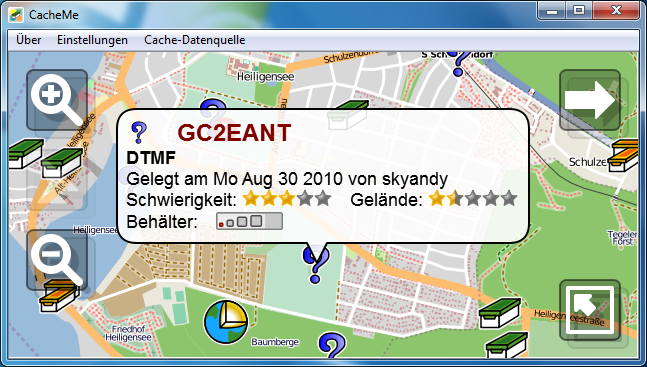
CacheMe is designed to be portable and flexible. Portability is achieved by using the Qt framework which is supported on various platforms. The flexibilityis achieved by extensively using plugins to include functionality like new map sources or geocache location providers.
Some of the highlights include:
CacheMe is primarily used for online usage. You need to be connected to the internet to use this mode. In online mode you can use any of the map service providers delivered with CacheMe together with the GcLive cache provider mode. This is the default if you start CacheMe for the first time. CacheMe will then connect to the geocaching.com site and accessing geocaching.com through the GcLive API, giving you a faster and more intuitive experience then a normal web browser would give you. For an even faster experience, CacheMe stores cache information locally once fetched from the internet. Thus images won't be downloaded over again if you reopen a certain cache detail view. This also lowers bandwidth requirements significantly.
You need to input your geocaching.com account credentials into the CacheMe settings to allow the GcBrowser to log into geocaching.com and to retrieve detailed cache informations for you. These credentials or stored locally on your device and never be forwarded to anything else but the geocaching.com site for login purposes.
Keep in mind that you are still using the geocaching.com site though the CacheMe GcLive plugin. If that site is unreachable or down, then CacheMe will work slow or not properly at all. Also geocaching.com is frequently undergoing updates and may be inaccessible from time to time during such updates. If you experince problems with CacheMe please check geocaching.com with your web browser to see if the site is operational.
Despite the fact that CacheMe is intended to be used online, a limited offline mode is also available. In the settings select the "Cloudmade" map service provider. This supports limited caching of map tiles and if you visit a certain area e.g. while being online at home or in the hotel a limited portion of map data will be stored on the device and can be re-used in the field. However, this is a service provided by the CloudMade GeoService plugin and is not a specific part of the CacheMe and thus e.g. the tile caching may not work perfectly for these purposes.
For offline geocache information select the GPX cache provider plugin in the menu and load a Pocket Query. You don't need to unzip them, CacheMe will do this itself if necessary.
Images are not included in those pocket queries. To view the images, open the cache description while being online. The downloaded images will be kept locally on the device and the next time you watch the same cache description it won't need to download them again.
If you encounter problems with your version, please check in the about box whether you are using the latest version:
See the changelog for a full history.
The latest version may not also be available in time for all supported platforms. If your platform hasn't yet been updated, check back a few days later. If a version is missing for a week, then feel free to send an email.
The todo list for future updates includes:
CacheMe has been ported to various platforms since it's using the Qt framework. Although Qt and QtMobility are officially supported on various platforms, in reality not a single platform provides a 100% end-user friendly solution for QtMobility.
This is the platform CacheMe is mainly being developed on. Currently it's not distributed in binary form. Since QtMobility is not a part of any desktop Linux distribution, it has to be added from 3rd party repositories like the Forum Nokia Qt PPA for Ubuntu.
CacheMe comes with a special location plugin which allows CacheMe to connect to the GPS daemon as used on most desktop linux versions.
This the platform CacheMe has initially been developed for. Although having been released officially on November 2010, the necessary QtMobility 1.2 is still only available as a community provided port for Maemo5.
Since version 0.9.0 CacheMe includes secret tokens required for access to the geocaching.com site. Thus CacheMe cannot be distributed with source code anymore and thus no Maemo5 version can be distributed via the extras-devel repository. For these reasons there's only the binary download:
This is the plattform CacheMe was initially be started for when it became clear that MeeGo/Harmattan won't include the hildon/gtk frameworks and thus won't be able to run my GPXView application. Unfortunately it wasn't clear at that time that plain Qt apps also wouldn't be supported by a proper themeing in the final MeeGo/Harmattan releases, so the work that started to have a geocaching application ready in time for this new operating system seemed to be doomed before the first device was sold.
In the meantime George Ruinelli is frequently modifying and re-packaging the Maemo5 version for Harmattan and does some modifications to circumvent some of the most important problems that arise from the fact that Harmattan does not include a theming for plain Qt applications like CacheMe.
I have decided not continue the harmattan version due to the decision of Nokia not to sell the n9 in germany. Without any device directly available to the end user i just don't see an audience for my application. However, Symbian will still be supported.
Symbian^1 is now officially supported and available in the store for many symbian^1 phones. Unfortunately CacheMe for symbian 1 currently doesn't pass the QA at nokia for several devices (incl. the 5320, c5 and c6). Nokia QA isn't very helpful here and i haven't yet been able to figure out what exactly they don't like (they claim it's slow/or completely freezes on these devices). It has been suggested that the issue may be related to Qt bug 19523, but a first attempt to work around this obviously didn't solve the problem. At least until that problem is solved i'll make test versions available here.
A test version can be downloaded below:
Symbian^1 has significant memory limitaions over Symbian^3 and you should be aware that installing the required Qt libraries on your device may require ~13MB free storage space on the internal C: storage.
Due to missing proper Qt mobility support on windows the Windows version is no longer supported.
CacheMe does not work on certain platforms it might/should actually run on. This has several reasons.
Since Necessitas project release 0.3 CacheMe can be compiled using necessitas. But i have not yet been able to actually run it as the emulator claims it crashes. This needs further investigation..
I don't have a Mac and thus no way to compile and test for MacOS.
Currently CacheMe supports the english language (built-in), the german and the slovak language (by external translation file). You can do your own translation using qt linguist. You can start with the translation file skeleton below. Rename it to your own locale (e.g. to cacheme_fr.ts for french) and use the qt linguist application to add the translations for your language. Finally use "release" from the file menu to export your translations into the binary translation file (e.g. cacheme_fr.qm).
The resulting binary file can the be copied to the installation. E.g. under Symbian to E:\data\cacheme\lang if CacheMe is installed on the internal Mass Memory.
If you've trouble downloading the cacheme_xx.ts file, then use the "save as" feature of your browser and make sure the resulting file is named cacheme_fr.ts (or whatever is appropriate for your desired language).
When doing the translation you can keep all those parts blank that you don't want to see translated. These will then still use the original english texts.
You can then share your translations with other users or send me the translated .ts file for inclusion into CacheMe. Be aware that CacheMe is under constant development and translations will have to be updated every now and then.
Several users have reported this. First please try selecting the help entry from the menu. This should open the web browser. If it doesn't, CacheMe generally is unable to open the browser on your device. Now please check if other apps can open the browser. E.g. the messaging app should be able to open the browser when you click on a link that you received with a text message. If this also doesn't work you have a general problem with third party apps launching the browser and your problem is not specific to CacheMe.
Several people solved this be resetting their phones or by restoring factory settings. It's still not clear what is causing this. My unproven assumption is that this is related to the installation of third party browsers like Opera. If you have this problem and find a less invasive way to solve it please report your findings.
There are some disadvantages for non-premium members as explained in section "Schedule A" of the Geocaching.com API License Agreement.
Thease restrictions are:
CacheMe is required to meet these limitations. If you are unsatisfied with these limitations you need to contact groundspeak. I have no influence on this as this is forced by the groundspeak servers.
If you are still not satisfied with the new version you can find an unlimited free copy of the last non-GCLive version 0.8.16 in the various device sections.
If seems CacheMe doesn't see any network connection at all. So far this always turned out to be a problem with the cellular network connection and in all those cases CacheMe turned out to work fine with a WiFi connection (which is of course pretty useless for geocaching).
This is typically a problem with the cellular setup of the phone, a general malfunction in the cellular part of the phone or due to some limitations imposed by certain "surf and email only" cellular contracts. In the latter case CacheMe may even encounter this problem if email and web surfing services work as expected. Some people have reported that simply rebooting the phone helped.
CacheMe does not make any assumptions about the type of network connection the phone uses. It just requests data to be sent and doesn't even know about different network types. It is designed to work regardless of the type of network connection the phone uses.
It will close after one minute of use. An unrestricted Symbian version is available from the store. The version available here will stop working after some time to avoid having to support two versions and it's not guaranteed that there'll always be a time limited free version avaiable.
Since CacheMe version 0.9.0 the authorization is done through the web browser. CacheMe itself doesn't need the password anymore and you can be sure that your password cannot be misused by CacheMe. Instead CacheMe receives an access token during this authorization process. The token is saved and authorization is only required once.
Only the Cloudmade map stores tiles at all and this is limited to 30MB. Older data will be overwritten if this limit is reached.
This is a limitation of Nokias Qt Mobility framework. It doesn't allow the map once displayed to change it's service provider.
The magnetic compass needs to be calibrated. There a small gray circle in the lower right corner of the compass view if the magnetic compass is available. Turn your phone around all three axes until this circle is completely green. The compass is then fully calibrated and should work fine.
This is not a compass arrow. Instead the blue arrow points into the direction the phone itself is facing. If the phone faces westwards, then the arrow points west on the map. Simply speaking: The arrow always shows the direction you are currently facing.
Yes, updates are supposed to be free and should be available directly via the OVI store application.
I don't know why the OVI store sometimes doesn't offer to install updates automatically. This is an OVI issue and not a CacheMe issue. Anyway, you can uninstall the old version and reinstall the latest version without having to pay again. Unfortunately only five such re-installations are allowed by Nokia. I have no influence on this.
Go to the navigation view, click the small "tool" icon and select "New" from the popup menu to create a new custom coordinate.
No, sorry, i don't have a twitter account and don't plan to get one.
Not yet. Although you might have OVI maps support on your device as well as OVI maps support in the Qt framework used by CacheMe, these are two very different things. Nokia seems to have plans to support offline maps in Qt, so there's hope that this might actually change.
 EMail
EMail BlueMP3